

开发环境
uniapp+springboot
跳转链路以及需要调用的接口
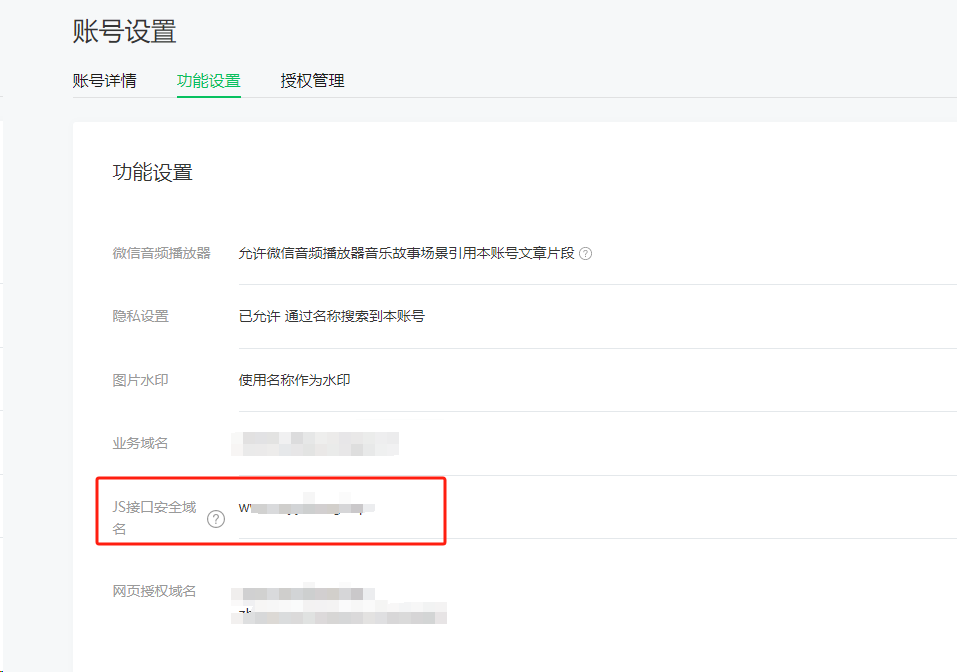
设置微信公众号js接口安全域名。路径:【设置与开发】-【账号设置】-【功能设置】
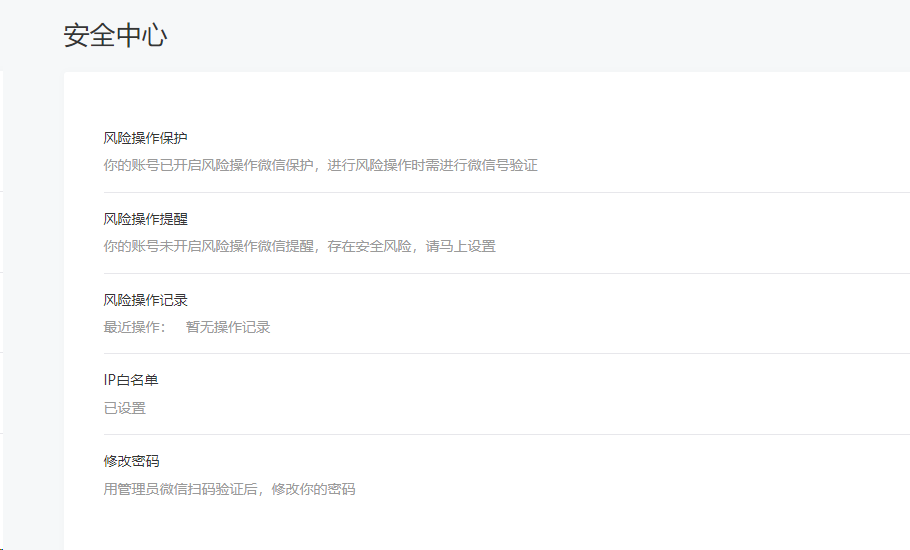
设置IP白名单。设置路径:【设置与开发】-【安全中心】
获取微信accesstoken
// 后端核心代码
public JSONObject getWechatAccesstoken(JSONObject jsonObject) {
    // ?grant_type=client_credential&appid=APPID&secret=APPSECRET
    String appid = jsonObject.getString("appid");
    String secret = jsonObject.getString("appsecret");
    String url = "https://api.weixin.qq.com/cgi-bin/token?grant_type=client_credential&appid=" + appid + "&secret=" + secret;
    log.debug("开始获取accesstoken==>{}", url);
    String s = HttpUtil.doGet(url);
    log.debug("获取accesstoken返回==>{}", s);
    return JSONObject.parseObject(s);
}
获取微信签名ticket
// 后端核心代码
public JSONObject getWechatTicket(JSONObject jsonObject) {
    // https://api.weixin.qq.com/cgi-bin/ticket/getticket?access_token=ACCESS_TOKEN&type=jsapi
    String accessToken = jsonObject.getString("accessToken");
    String url = "https://api.weixin.qq.com/cgi-bin/ticket/getticket?access_token=" + accessToken + "&type=jsapi";
    log.debug("开始获取WechatTicket==>{}", url);
    String s = HttpUtil.doGet(url);
    log.debug("获取WechatTicket返回==>{}", s);
    return JSONObject.parseObject(s);
}
页面路径的签名
// 后端核心代码
public JSONObject genWechatJSAPIConfig(JSONObject jsonObject) {
    // Wm3WZYTPz0wzccnW
    String noncestr = SignatureGeneratorUtil.randomStr(16);
    String ticket = jsonObject.getString("ticket");
    // 1414587457
    String timestamp = System.currentTimeMillis() / 1000 + "";
    String requestUrl = jsonObject.getString("signLink");
    String sign = SignatureGeneratorUtil.generateSignature(noncestr, ticket, timestamp, requestUrl);
    JSONObject result = new JSONObject();
    result.put("appId", "你的appid");
    result.put("timestamp", timestamp);
    result.put("nonceStr", noncestr);
    result.put("signature", sign);
    log.debug("wx.config返回的参数为==>{}", JSONObject.toJSONString(result));
    return result;
}
SignatureGeneratorUtil工具类
package com.myyidong.common.util;

import lombok.extern.slf4j.Slf4j;

import java.nio.charset.StandardCharsets;
import java.security.MessageDigest;
import java.security.NoSuchAlgorithmException;
import java.util.*;

/**
 * 微信的签名方法
 */
@Slf4j
public class SignatureGeneratorUtil {
  // 生成签名字符串的方法
  public static String generateSignature(String noncestr, String jsapiTicket, String timestamp, String url) {
    // 将参数放入Map中
    Map<String, String> params = new HashMap<>();
    params.put("noncestr", noncestr);
    params.put("jsapi_ticket", jsapiTicket);
    params.put("timestamp", timestamp);
    params.put("url", url);

    log.info("params"+params.toString());

    // 对参数按照字段名的ASCII码从小到大排序
    List<String> keys = new ArrayList<>(params.keySet());
    Collections.sort(keys);

    // 按照key=value的格式拼接成字符串
    StringBuilder sb = new StringBuilder();
    for (String key : keys) {
      sb.append(key).append("=").append(params.get(key)).append("&");
    }
    // 去除最后一个"&"
    sb.deleteCharAt(sb.length() - 1);

    // 对拼接后的字符串进行SHA-1签名
    return sha1(sb.toString());
  }

  // SHA-1签名方法
  private static String sha1(String input) {
    try {
      MessageDigest md = MessageDigest.getInstance("SHA-1");
      byte[] digest = md.digest(input.getBytes(StandardCharsets.UTF_8));
      StringBuilder sb = new StringBuilder();
      for (byte b : digest) {
        sb.append(String.format("%02x", b & 0xff));
      }
      return sb.toString();
    } catch (NoSuchAlgorithmException e) {
      // 日志输出,无其他业务处理,可以使用其他方法代替
      LogOutUtils.exceptionLogOut(e);
      return null;
    }
  }
}
this.commonUtil.requestStandard(
    'http://ip:port/genWechatJSAPIConfig',
    data
).then(res => {
	 let data = res.data
	 jweixin.config({
		 debug: true,
		 appId: data.appId,
		 timestamp: data.timestamp,
		 nonceStr: data.nonceStr,
		 signature: data.signature,
		 // 需要使用的JS接口列表
		 jsApiList: ['wx-open-subscribe', 'wx-open-launch-weapp',
		 'updateTimelineShareData', 'chooseImage', 'previewImage'
		 ],
		 // 开放标签,跳转小程序时必填
		 openTagList: ['wx-open-launch-weapp']
	 });
	 jweixin.ready(function() {
		 console.log("..1....");
     });
	 jweixin.error(function(res) {
		 console.log("..2....", JSON.stringify(res));
	 });
})
前端完整代码
<template>
	<view>
		<wx-open-launch-weapp id="launch-btn" appid="你的小程序appid" path="你的小程序路径以及拼接的参数" env-version="版本(开发、体验、线上)">
			<script type="text/wxtag-template">
				<style>
					.open-img {
					 display: block;
					 margin: 0 auto;
					 width: 32px;
					 height: 32px;
					}
				</style>
				<div>
					<img class="open-img" src="http://ip:port/demo.png"></img>
				</div>
			</script>
		</wx-open-launch-weapp>
	</view>
</template>
<script>
	import jweixin from '/jweixin-1.6.0.js'
	export default {
		data() {
			return {
			}
		},
		onLoad(option) {
			//最好是在这里把当前网址传给后台进行签名
			let data = {
				ticket: 'HoagFKDcsGMVCIY2vOjf9jIL0_rbOLn3KgNhkj-xLej37bHNP2eeKTnjfMkK2LsXfBkCgmTy4jFsHrSBme2Rvg',
				signLink: location.href.split('#')[0]
			}
			this.commonUtil.requestStandard(
				'http://ip:port/genWechatJSAPIConfig',
				data
			).then(res => {
				let data = res.data
				jweixin.config({
					debug: true,
					appId: data.appId,
					timestamp: data.timestamp,
					nonceStr: data.nonceStr,
					signature: data.signature,
					// 需要使用的JS接口列表
					jsApiList: ['wx-open-subscribe', 'wx-open-launch-weapp',
						'updateTimelineShareData', 'chooseImage', 'previewImage'
					],
					// 开放标签,跳转小程序时必填
					openTagList: ['wx-open-launch-weapp']
				});
				jweixin.ready(function() {
					console.log("..1....");

				});
				jweixin.error(function(res) {
					console.log("..2....", JSON.stringify(res));
				});
			})
		},
		methods: {
			// 监听跳转
			sucFun() {
				console.log('跳转');
			},
			// 监听错误
			errFun() {
				console.log('失败');
			},
		}
	}
</script>

<style>
	.container {
		display: block;
		box-sizing: border-box;
		padding: 30px;
		width: 100%;
		/* background-color: red; */
	}
</style>
注意事项
一定要保证jweixin.config方法通过签名校验,否则跳转按钮不显示!!!!
前端jweixin.config方法中的signLink获取到的链接地址的域名必须与公众号js接口安全域名保持一致,否则签名校验不通过!!!!
评论